See how your code holds together.
Atlas draws your code as a small piece of mathematics: objects, functions, and the topology of how they are connected. You and your coding agent look at the same picture, which makes it easier to collaborate.
The same figure from two very different programs.
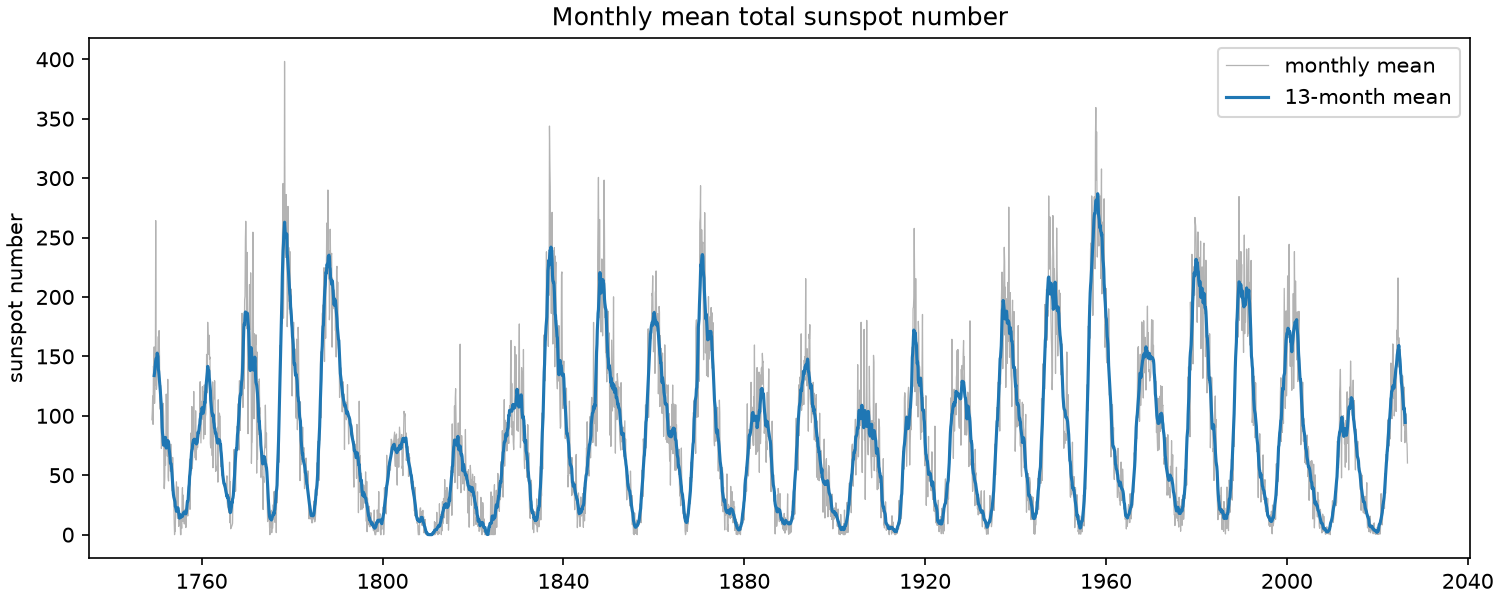
Imagine a program that smooths sunspot data. It fetches the monthly sunspot counts since 1749 from the web, keeps them as a CSV, takes the mean over 13 months and draws both. This is what it makes.
Two programs make exactly this figure: one a sloppy script, one typed and elegant. The output cannot tell them apart. How do you see which one is slop?


Atlas shows you. Both reach the same places: the web, the raw CSV, the figure. Inside they part. In the sloppy script every step reads and changes one global, Global(sunspots.df), and nothing is handed from step to step. In the typed one the CSV stands between download and load, a DataFrame goes from step to step, and the command names every file. A red dot is a question Atlas asks the author. Open the typed one in Atlas and click around: it is a live picture.
Port it, and see whether the design survived.
Code gets rewritten in another language, more and more often by an agent. Tests tell you the port makes the same figure; they do not tell you the design survived. Atlas reads Python, Rust and TypeScript into the same picture, so a step gone or a place moved shows.
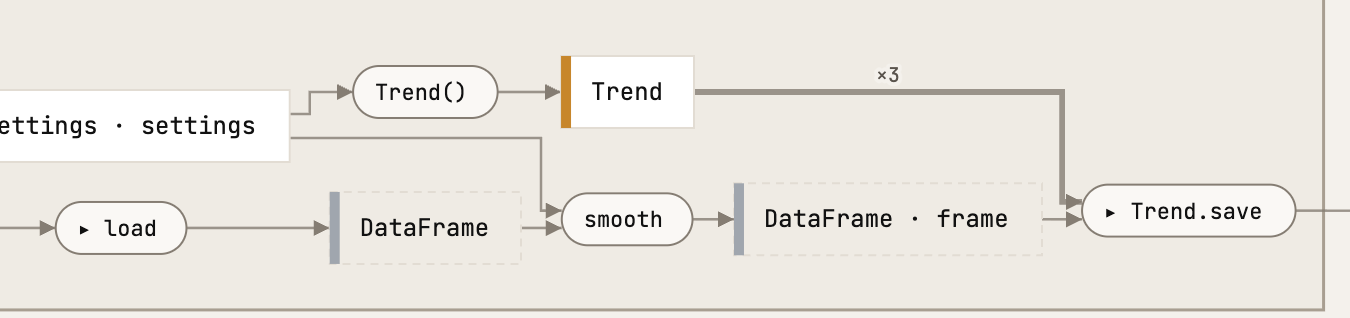
Python, typed. load gives a pandas DataFrame; smooth takes it and gives it back with a smoothed column, and Trend.save draws that one frame with matplotlib. Open the whole live picture and click around →
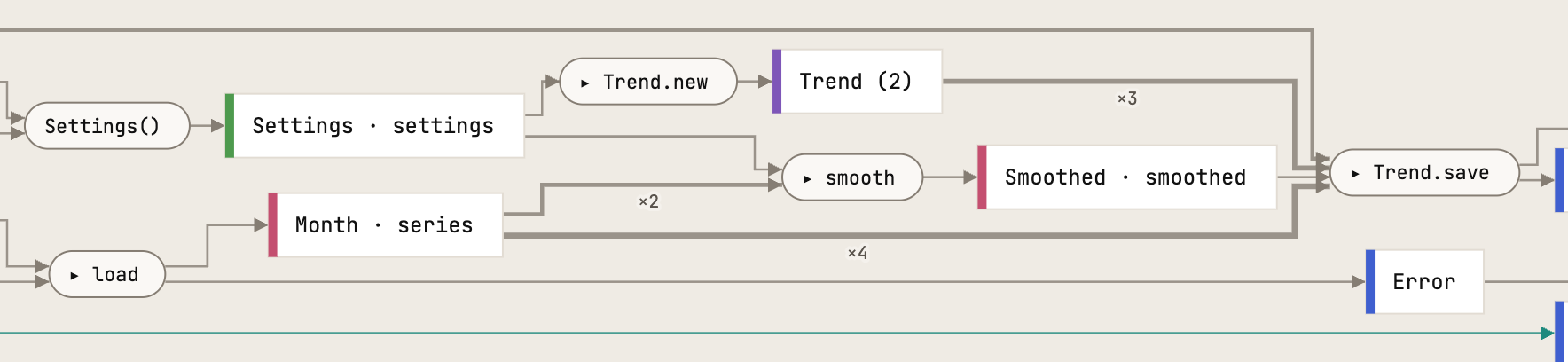
Rust, ported. The same step: smooth between load and Trend.save. What it is handed differs with the libraries: Rust has no DataFrame, so load gives a list of Month records, smooth gives Smoothed means beside them, and Trend.save is handed both. Open the whole live picture and click around →
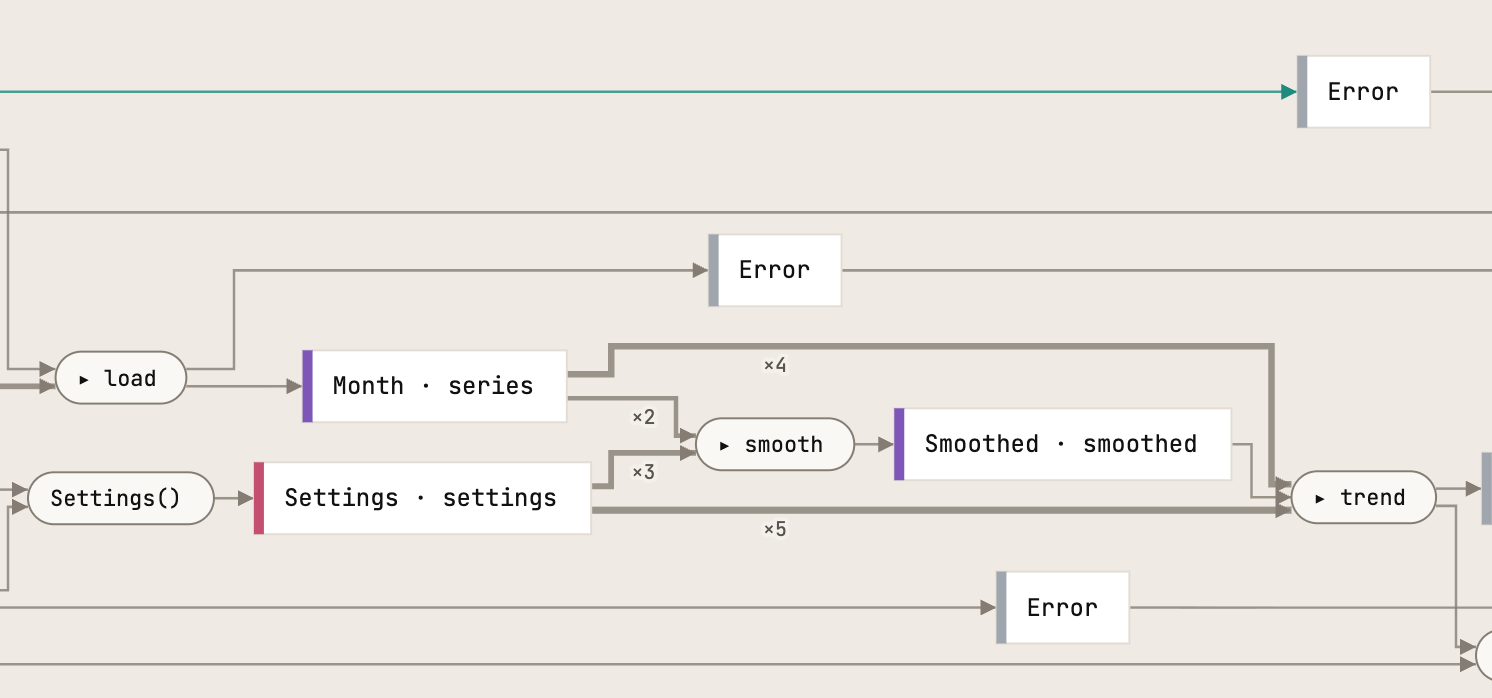
TypeScript, ported. The same shape as Rust: Month records from load, Smoothed means from smooth, both handed to trend, which draws an SVG. Open the whole live picture and click around →
Say exactly what you mean: point at it.
Your agent lives in text. Humans process images much faster. Connecting your agent with Atlas gives it a way to highlight elements in the schema and to read and write notes directly in the schema.
Connect Atlas to your agent once
Claude Code
claude mcp add --scope user atlas -- atlas mcp
Codex
codex mcp add atlas -- "$(command -v atlas)" mcp
Then run atlas serve in a repository and open the page it prints. What follows is a session with Claude Code on the sunspots program: what was said in the chat, and what the page showed.
1 · You ask where something happens; the agent points at it
Where does the smoothing happen?
Ran a command, used 2 tools ›
The smoothing happens in the smooth step, and that step now lights up on your page. I switched the page from the package overview to the run route and pointed at smooth.
In the picture you can see it sits between load and Trend.save:
- What goes in: the
DataFramethatloadmakes from the raw CSV, plusmonthsfromSettings(13 unless you pass--months). - What comes out: the same
DataFramewith an extrasmoothedcolumn, whichTrend.savedraws.
In the code it's one line, in src/sunspots/series.py:
def smooth(frame: pd.DataFrame, months: int) -> pd.DataFrame:
    return frame.assign(smoothed=frame["mean"].rolling(months, center=True).mean())
That's a rolling mean over 13 months, centred on each month.

2 · You write a note on a box
Alt-click a box, type, press enter. The note stays on the box, with the view and the commit it was written at. One more note went on load: what happens if the data on the web changes?
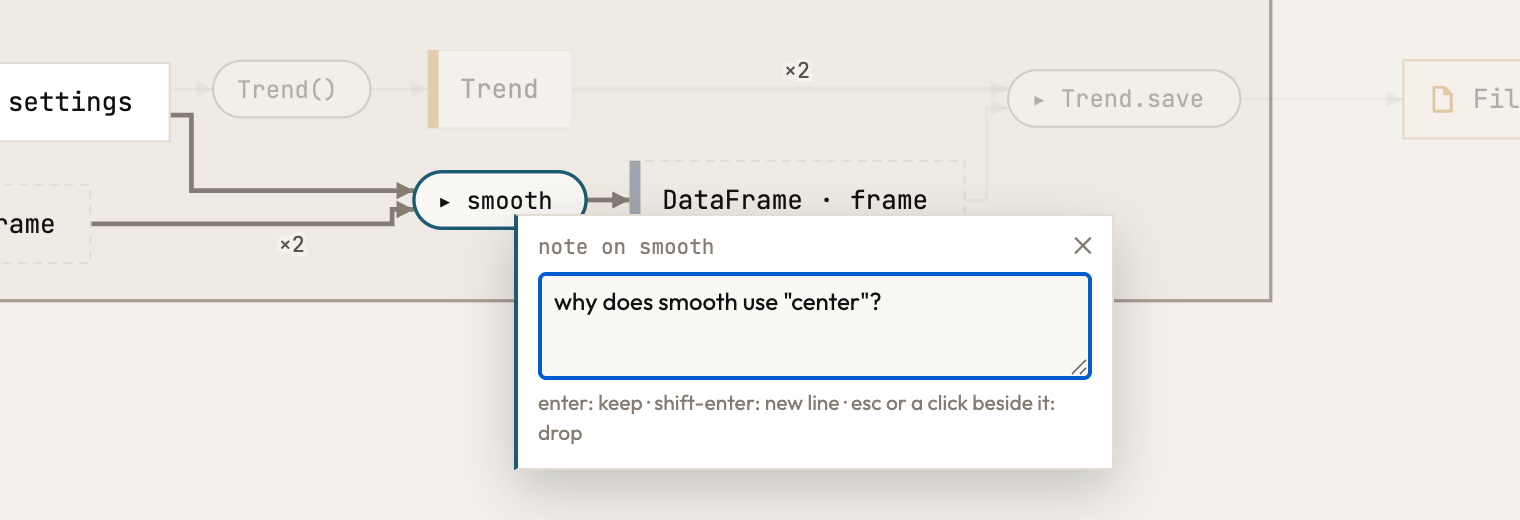
3 · The agent reads your notes and answers on the box
can you read my notes?
Used 5 tools ›
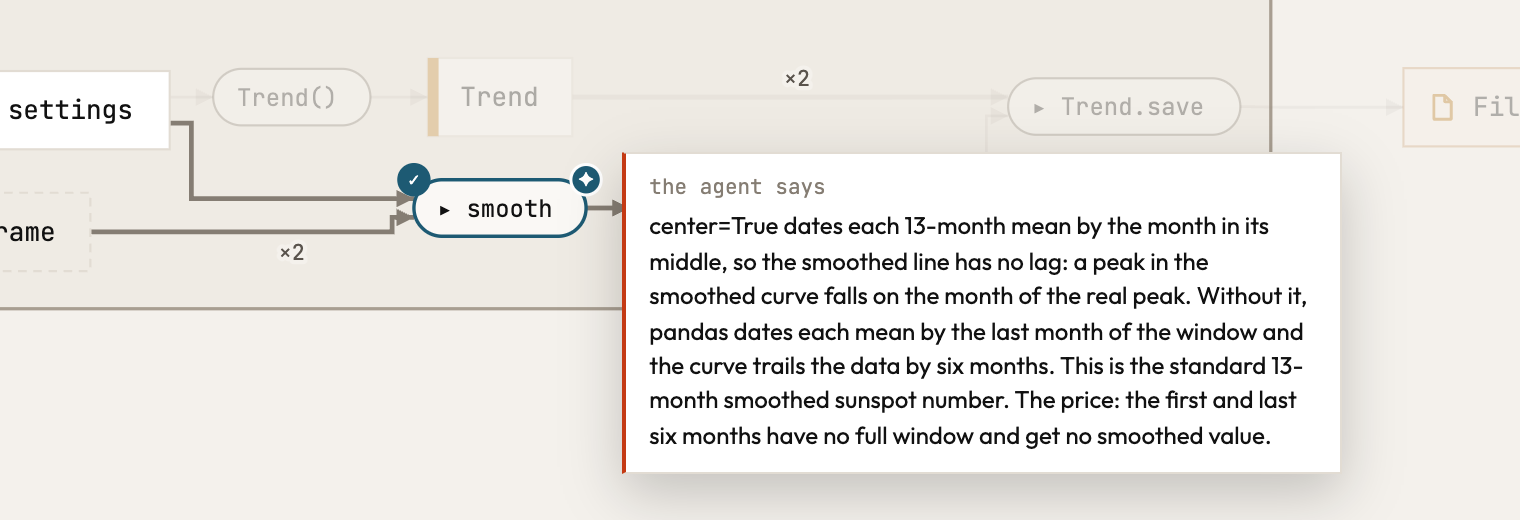
Yes, I found two notes. I answered each one on its box (it shows as a mark with my answer when you hover) and marked both resolved.
Note 1, on smooth: “why does smooth use center?”center=True labels each 13-month mean with the month in the middle of those 13 months. That way the smoothed line doesn't lag: a peak in the blue curve falls in the same month as the real peak. Without it, pandas labels each mean with the last month of the 13, and the curve trails the data by six months. This 13-month centred mean is the standard smoothed sunspot number. The cost is that the first and last six months don't have 13 months around them, so they get no smoothed value.
Note 2, on load: “what happens if the data on the web changes?”
Nothing, as long as the CSV is still on disk. load reads data/raw/sunspots.csv, and download only runs when that file is missing. You can see that in the dashed frame “only when not raw.exists()”. If SILSO adds a month or revises an old one, the figure only picks it up after you delete the file or point --raw at a new path.
Design the next feature before you write it.
Ask your agent for a change and it shows you the change, not a description of it: a vision, a sketch drawn beside the code as it is, where only what the code would add is green. When you say yes, the sketch goes into your code as a prophecy, dotted purple: the same shape, now real code that Atlas reads with real types, and a list of what is left to build. Write the bodies, remove the marker, and the dots become solid.
I want to add a function that tracks and marks the maxima of the cycles, do you have a proposal for how to build that?
Ran 2 commands, used 4 tools ›
Yes. My proposal is now drawn on your page as a vision, beside the code as it is, and I've pointed at the new peaks step. Your files are unchanged so far.
The proposal: the maxima travel along in the DataFrame you already have, the same way the smoothing does.
peaks(frame, years)goes inseries.py, next tosmooth. It returns the sameDataFramewith an extrapeakcolumn.peakis true where the smoothed mean is the highest withinyearsyears around that month, which is the maximum of a solar cycle. By defaultyearsis 11, the length of a cycle.Cycles(Trend)goes inplot.py. It draws the same figure asTrendand marks the rows wherepeakis true.run_cyclesgoes incli.py:load → smooth → peaks → Cycles.save, with a--yearsoption. It's a new command next torun, not a change torun, so the picture shows exactly what gets added.
On the page, the new route draws in green: the same web, the same CSV and the same figure, with one more step between smooth and saving.
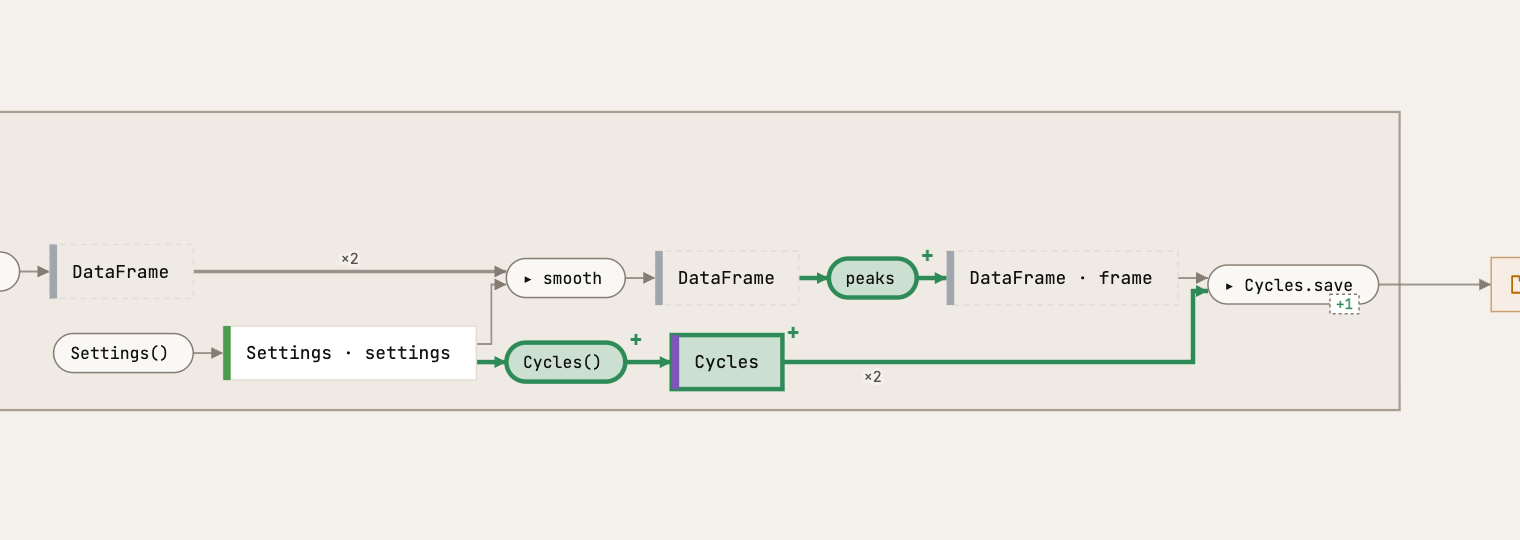
You ask for a change; the agent shows it. A sketch drawn beside the code as it is, with what it adds in green. Nothing is written in your files: the chat can say a lot, the picture shows it at a glance.
yes, looks great. Set up a prophecy in the code
Ran 2 commands, used 3 tools ›
The design is now in your code as a prophecy, and I've pointed your page at the new route. The three new parts draw dotted purple there: written, but not built yet.
What's in your files now (not committed; that's up to you):
series.py:peakswith its signature and docstring, marked@prophecy(). Its body israise NotImplementedErrorfor now.plot.py:Cycles(Trend), marked@prophecy(). ItsdrawcallsTrend.drawfirst; the marking itself is still to be written.cli.py:run_cycles, marked@prophecy(supersedes="sunspots.cli.run"). That means it is meant to replacerun.
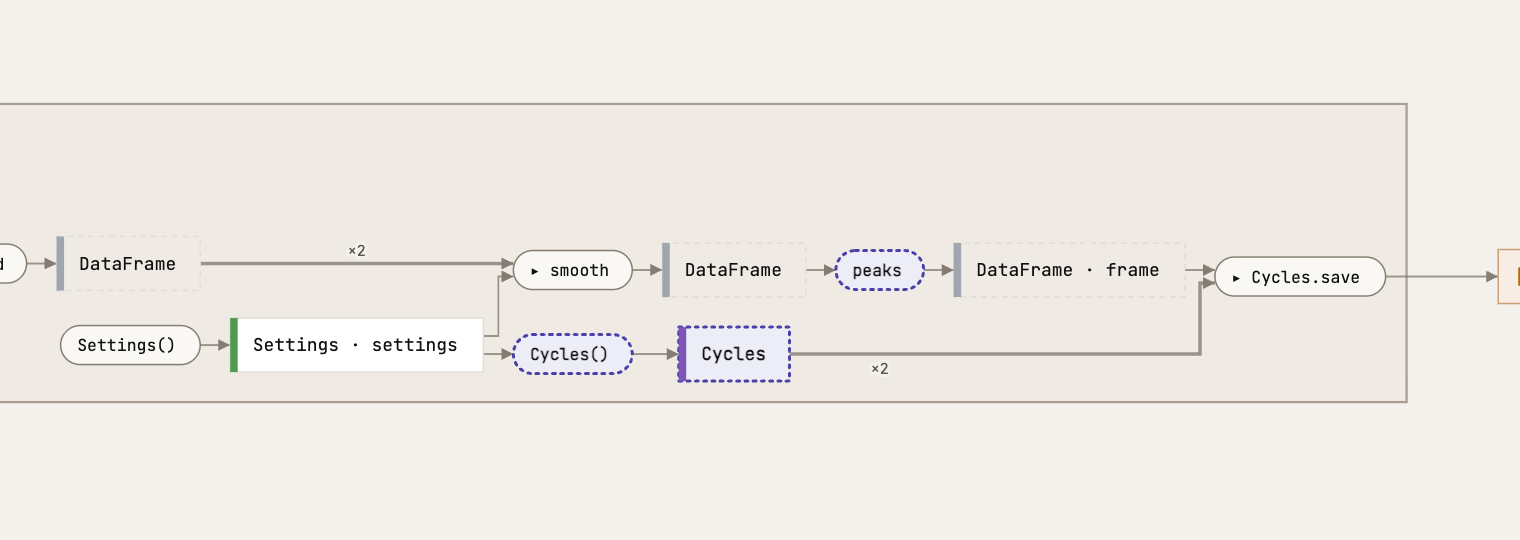
You say yes; it goes into your code. The same sketch, now real code that Atlas reads with real types, marked as not built yet and drawn dotted purple: the shape of the vision, kept in your files until it is built.
How far along is the implementation?
Used atlas: revelation ›
Let me use atlas revelation to check.
The design is in place, but none of it is built yet. Atlas lists three prophecies, each with one body still to write:
| Where | What | Still to do |
|---|---|---|
cli.py:32 | run_cycles, which will replace run | 1 body |
plot.py:44 | Cycles, the figure with the maxima marked | 1 body |
series.py:29 | peaks, which finds the maximum of each cycle | 1 body |
Nothing built leans on them yet, so run and Trend keep working as they do now.
The real work is in peaks, finding the maxima, and in Cycles.draw, marking them on the figure. run_cycles already calls everything in the right order; all it needs is to lose its marker. Shall I build it?
# series.py
@prophecy()
def peaks(frame: pd.DataFrame, years: int) -> pd.DataFrame:
    """`frame` with a `peak` column: true where the smoothed mean is the highest
    within `years` years around it, the maximum of a solar cycle."""
    raise NotImplementedError

# plot.py
@prophecy()
class Cycles(Trend):
    """The trend, with the maximum of each solar cycle marked."""

    def draw(self, frame: pd.DataFrame) -> Figure:
        figure = super().draw(frame)
        ...
        return figure

# cli.py
@app.command()
@prophecy(supersedes="sunspots.cli.run")
def run_cycles(raw: Path = RAW, figure: Path = FIGURE, months: int = 13, years: int = 11) -> None:
    """Like `run`, and mark the maximum of each solar cycle on the trend."""
    settings = Settings(months=months)
    if not raw.exists():
        download(SILSO, raw)
    frame = peaks(smooth(load(raw), settings.months), years)
    Cycles(settings).save(frame, figure)
You ask how far along it is. Each new part carries a marker, @prophecy, and atlas revelation lists them: what each replaces, and how many bodies are left to write. The design is done when the list is empty.
# series.py
def peaks(frame: pd.DataFrame, years: int) -> pd.DataFrame:
    """`frame` with a `peak` column: true where the smoothed mean is the highest
    within `years` years around it, the maximum of a solar cycle."""
    highest = frame["smoothed"].rolling(12 * years, center=True, min_periods=1).max()
    return frame.assign(peak=frame["smoothed"] == highest)

# plot.py
class Cycles(Trend):
    """The trend, with the maximum of each solar cycle marked."""

    def draw(self, frame: pd.DataFrame) -> Figure:
        figure = super().draw(frame)
        ax = figure.axes[0]
        maxima = frame[frame["peak"]]
        ax.scatter(maxima.index, maxima["smoothed"], color="C3", zorder=3, label="cycle maximum")
        ax.legend()
        return figure

# cli.py
@app.command()
def run_cycles(raw: Path = RAW, figure: Path = FIGURE, months: int = 13, years: int = 11) -> None:
    """Like `run`, and mark the maximum of each solar cycle on the trend."""
    settings = Settings(months=months)
    if not raw.exists():
        download(SILSO, raw)
    frame = peaks(smooth(load(raw), settings.months), years)
    Cycles(settings).save(frame, figure)
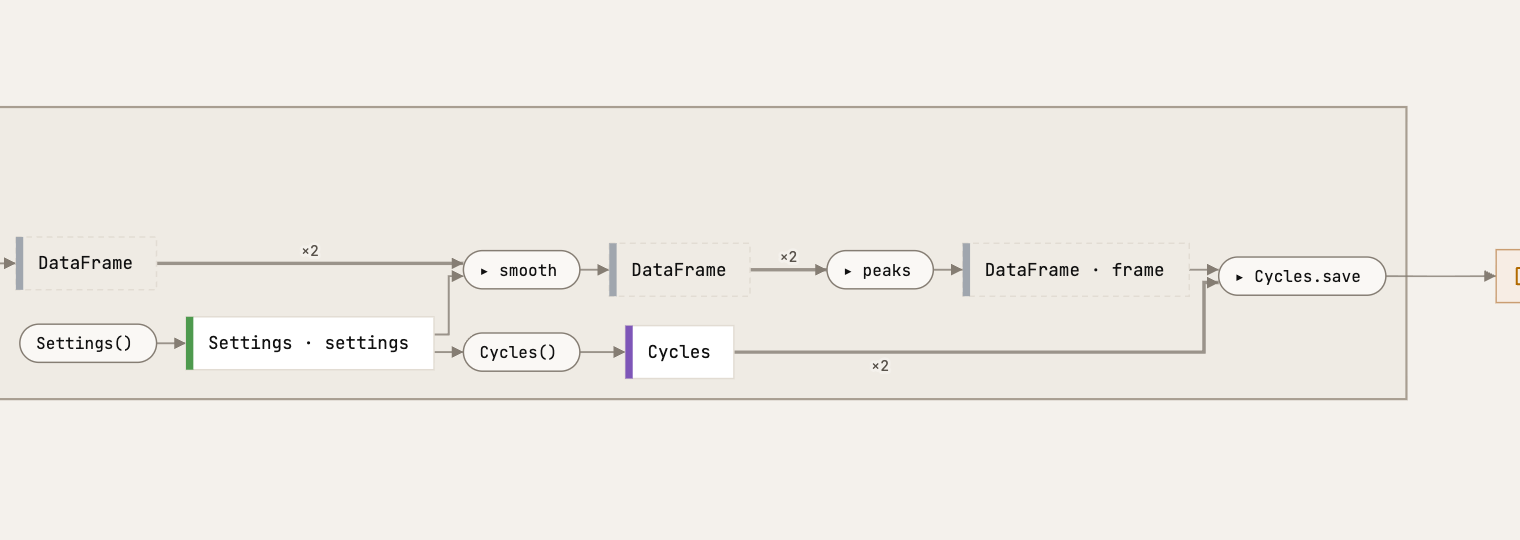
Built. The agent writes the bodies and takes the markers away. atlas revelation finds no prophecies any more, and the dotted boxes are solid: the same route, built.
See what a change did, without reading the diff.
A pipeline grows one commit at a time: the download, the load, the first figure, the smoothing, a filter, and last the maxima of the solar cycles. Pick any two commits and Atlas draws them as one picture. Here the fifth against the sixth: the new path from the smoothed months to a second figure is filled green, and nothing else moved.

added removed changed: its own arrows differ
Your README draws itself.
Every push redraws the picture of your code in your README. It runs on GitHub, so there is nothing to install on your laptop. How to set it up →
sunspots

The monthly mean sunspot number since 1749, downloaded once, smoothed and drawn.
How the code works
Click to explore.
Drawn from 3f9c2e1, the last push to main.
About
The monthly mean sunspot number, smoothed and drawn.
- Readme
- 58 stars
Deployments
- github-pages 2 hours ago
Languages
- Python 100.0%
Why it holds together: the mathematics of your code.
Mathematics is a language that allows you to make things consistent. Best practices in coding are consistent, so it makes sense to view your computer code through a mathematical perspective. Because we can turn the mathematics of the code into a visual, you can literally see the consistency of your code, if you followed best practices. This is independent of the language you use: every program is drawn by the same mathematical rules.
These are the principles Atlas is built on, one picture each: how it looks in Atlas, and what the picture would be without it. A test checks each of them on every change to Atlas. Atlas is in beta, and there are known exceptions: we work on them in the open.
A category
Functions are arrows, and a route follows them from start to place.
In Atlas
Every step hands its result to the next. You can follow the arrows from where the program starts to where the data ends up.
Without it
Each step reaches into one shared value. Nothing is handed on, so there is no route: you cannot tell what comes first.
Effects in the arrow
What a function does to the world is part of it.
In Atlas
The file a step writes hangs on that step. You see who writes it.
Without it
The file is there, but no arrow leads to it. Something writes it, and the picture cannot say what.
A pushout
The same meaning gives the same picture.
In Atlas
Three languages, three spellings, one thing: an option the caller can change. Atlas draws the thing.
Without it
Drawn by their spelling, a program and its port look like three different programs.
Yoneda
A thing is what it connects to, not what it is called.
In Atlas
A function you renamed but that connects the same is the same function. The diff stays quiet.
Without it
Compared by name, a rename shows as one thing deleted and another added, and the real changes drown in it.
A partial map
What is not built yet is part of the picture.
In Atlas
A design can live in the code before it is built. The dotted part is the work still to do.
Without it
Finished code that already calls the sketch would run on nothing. Atlas asks about it.
A quotient
Zooming out is gluing, and nothing gets lost.
In Atlas
Closing a box glues its insides into one. Every line in and out stays, so the closed box still says what it reads and writes.
Without it
If zooming out could forget a line, a closed box would hide what it reads, and no overview could be trusted.
Types of arrows
A signature says what goes in and what comes out.
In Atlas
get_store says it gives a Store, so the picture follows the value to where it goes, like every other route.
Without it
Without a return type, nobody knows what get_store gives, and its route stops where the others go on.
Liskov substitution
A subclass keeps its base's promise.
In Atlas
Wherever the code expects an exporter, any kind of exporter fits: it takes what the base takes.
Without it
A subclass that asks for more breaks every caller that trusted the base.
Reach
What a step does itself, and what a step inside it does, are two things.
In Atlas
Closed, a solid line is what run does itself, a dashed one what a step inside it does. Open it, and the dashed line turns out to be store's.
Without it
Drawn alike, the closed picture says run writes the database itself. You look for the write in run's code, and it is in store.
A directed graph without cycles
Packages depend on one another in one direction.
In Atlas
Packages depend in one direction, so each can be read, tested or replaced on its own. This is about packages: inside a route a line may run back, where a step hands its result to the step that called it.
Without it
Two packages that reach for each other have no order: you cannot take either apart.
Every principle, in the language of mathematics and where it lives in Atlas: the mathematics. An introduction to category theory: pttrn.io.
Try it on your own code.
One binary. Your code stays on your machine.
macOS and Linux
curl -fsSL https://raw.githubusercontent.com/raoulg/atlas/main/install.sh | sh
Windows, in PowerShell
irm https://raw.githubusercontent.com/raoulg/atlas/main/install.ps1 | iex
From source, with a Rust toolchain
cargo install --locked --git https://github.com/raoulg/atlas atlas
And then atlas serve.
Your coding agent, once for every project
claude mcp add --scope user atlas -- atlas mcp
codex mcp add atlas -- "$(command -v atlas)" mcp
Claude Code's --scope user makes Atlas available in every project. Codex keeps its servers in one configuration for all projects and starts them without your shell's PATH, so it is given the binary's full path, which command -v atlas prints. Then atlas serve in any repository is all it takes: the agent's atlas mcp works on the repository the agent runs in, and shares the page with you.
Homebrew and how Atlas tells you about updates: install.